Group & Divider
Two light tools for bringing order to a busy Canvas. A Group is a named frame around a set of objects. A Divider is a line you draw to separate regions, with labels on each side — or arrows, to make it an axis.
Group
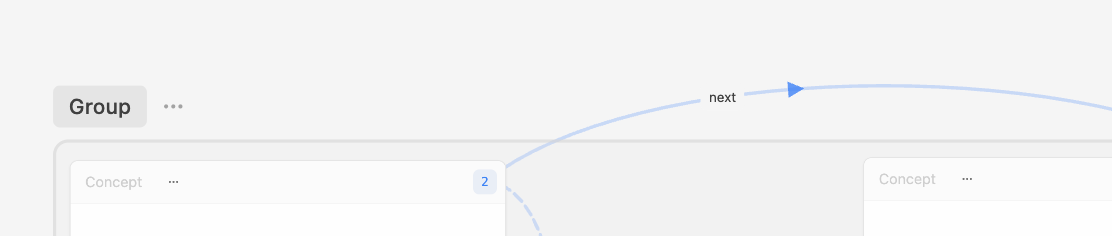
Make a Group
- Select the objects you want together (click,
⇧-click, or drag a marquee). - Right-click one of them and choose Group.
The new Group is called "Group". To add more later, drag an object into the frame; the frame highlights when you're over it.
Name it
Double-click the name in the frame's top-left corner and type. Or open the Group's menu → Rename.
Move and resize
- Drag the Group by its name to move it — everything inside moves with it.
- Drag the frame's edges or corners to resize it.
The Group menu
Right-click the frame, or click the ⋮ next to its name:
| Item | What it does |
|---|---|
| Rename | Edit the name. |
| Select all in Group | Selects every member, e.g. to move or connect them. |
| Move to Canvas... / Copy to Canvas... | Moves the Group and its members to another Canvas, or adds them there too. |
| Scale to View | "Fit this Group in view" — zooms the Canvas to the Group. |
| Chat with AI | "Use this Group as context" — opens Lino AI with the Group's members selected. |
| Ungroup | Removes the frame. The objects stay where they are. |
To take a single object out, right-click it → Remove from Group ("Leave "Group name"").
Example: on a "Thesis" Canvas, group your methods Cards as "Methods" and your sources as "Literature"; Chat with AI on "Literature" asks Lino AI about just those sources.
In Bento view each Group is a row, and its menu offers Rename, Move Up, Move Down, Reset Order, Chat with AI and Ungroup.
Divider / Axis
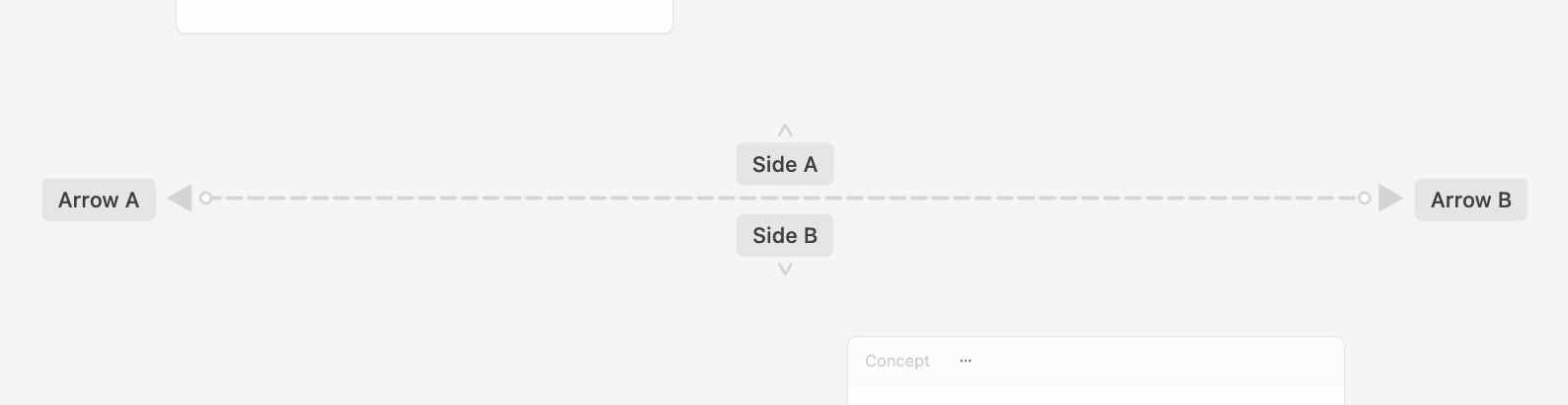
Draw one
- Right-click a blank spot → Divider / Axis (under Organize & Layout (Add)).
- Click to place points. The line follows your pointer from the last point.
- Double-click or press
↵to finish.esccancels.
A new Divider has two labels, "Side A" and "Side B", one on each side.
Edit it
Right-click the Divider:
| Item | What it does |
|---|---|
| Add node | Adds a bend point where you clicked, so you can reshape the line. |
| Delete node | Removes the point you right-clicked. |
| Arrow A / Arrow B | Switches an arrowhead on at the start / end — turns the line into an axis. |
| Side A labels / Side B labels | Add, edit or delete the labels on each side. |
| Delete | Removes the Divider. |
Double-click a label on the Canvas to edit it in place.
Example: draw a horizontal Divider with Arrow B on, label Side A "Cheap" and Side B "Expensive", and sort your option Cards along it.